Progress Notes in the Age of AI: How to Use Automation Without Losing Your Professional Voice
Team AbleSpace 5 min read

Progress notes have always been that "one thing" special education teachers can't seem to escape. They follow you from the school table to your drawing room sofa. They interrupt your planning sessions and steal time away.
For as long as anyone can remember, the unspoken rule for progress notes has been: Write them quickly; keep them compliant, and hope that you didn’t forget some bit of info you’ll need in two months.
But that rule is now being reshaped (thanks to AI), and many educators are feeling uneasy.
What happens when a machine helps you write? Will the notes start sounding generic and boring? Will they still include the nuances of each of your students? Will you end up handing over your professional judgment to some tool?
Those are some legitimate concerns. And ignoring them won't make the technology go away either. What will help you is remembering something pretty basic: Artificial intelligence can draft text for you; however, it cannot really determine instructional relevance.
The skill you must develop now isn’t about knowing how to write like a machine; it’s about learning how to make that machine work just as you would.
Here’s how to do that.
1. Treat AI as a Drafting Tool, Not the Author
AI has one major strength: it is extremely fast.
It can quickly scan for trends, reword awkward/clunky statements and transform raw data into readable language. That kind of speed is beneficial.
However, an AI that creates a note from start to finish (without your input or additional assistance) will always sound hollow.
The solution is quite easy. Feed the AI your data, not your job.A successful workflow would look something like this:
- You gather the raw and unorganised details: tally counts, work samples, anecdotal notes, session goals, prompts used.
- You write a brief summary of performance in your own words.
- AI then takes that summary and turns it into a structured note.
- You review and edit it to ensure it accurately represents the truth of your session.
That's it!
This is how you can gain the benefit of speed without having to compromise on accuracy or tone.
2. Keep Your Language Anchored in the Student, Not the Template
AI normally falls back on overly generic or template-like phrases.
"The student has demonstrated continued growth..."
"All in all, progress is emerging…”
These phrases look well-written and neat. Sadly, they don't tell us much at all.
The best way to utilise your professional voice is by anchoring sentences in observable details.
- “J stayed on task for 8 out of 10 problems with one verbal reminder.”
- “P independently generated three sentences after the initial prompt.”
- “During transitions, M needed two gestural prompts instead of the usual four.”
While AI can help you with restructuring these statements, it can never really invent them. By using specific language, you can make your note sound like you (and not like a generic form letter).
3. Use AI to Reveal Patterns You Might Miss in the Moment
One of AI’s most surprising strengths is its ability to "connect the dots" fast. Once you give it a week's worth of data, it can find trends that may not be so visible previously.
For example:
- Are the simpler items being completed more accurately, while there has been little improvement with the harder ones?
- Does a child show greater independence at certain times of the day?
- Does the number of prompts decrease when working on writing tasks and increase during math tasks?
When AI pulls such trends, it is not making instructional decisions for you. It is surfacing patterns that let you make better choices with better clarity.
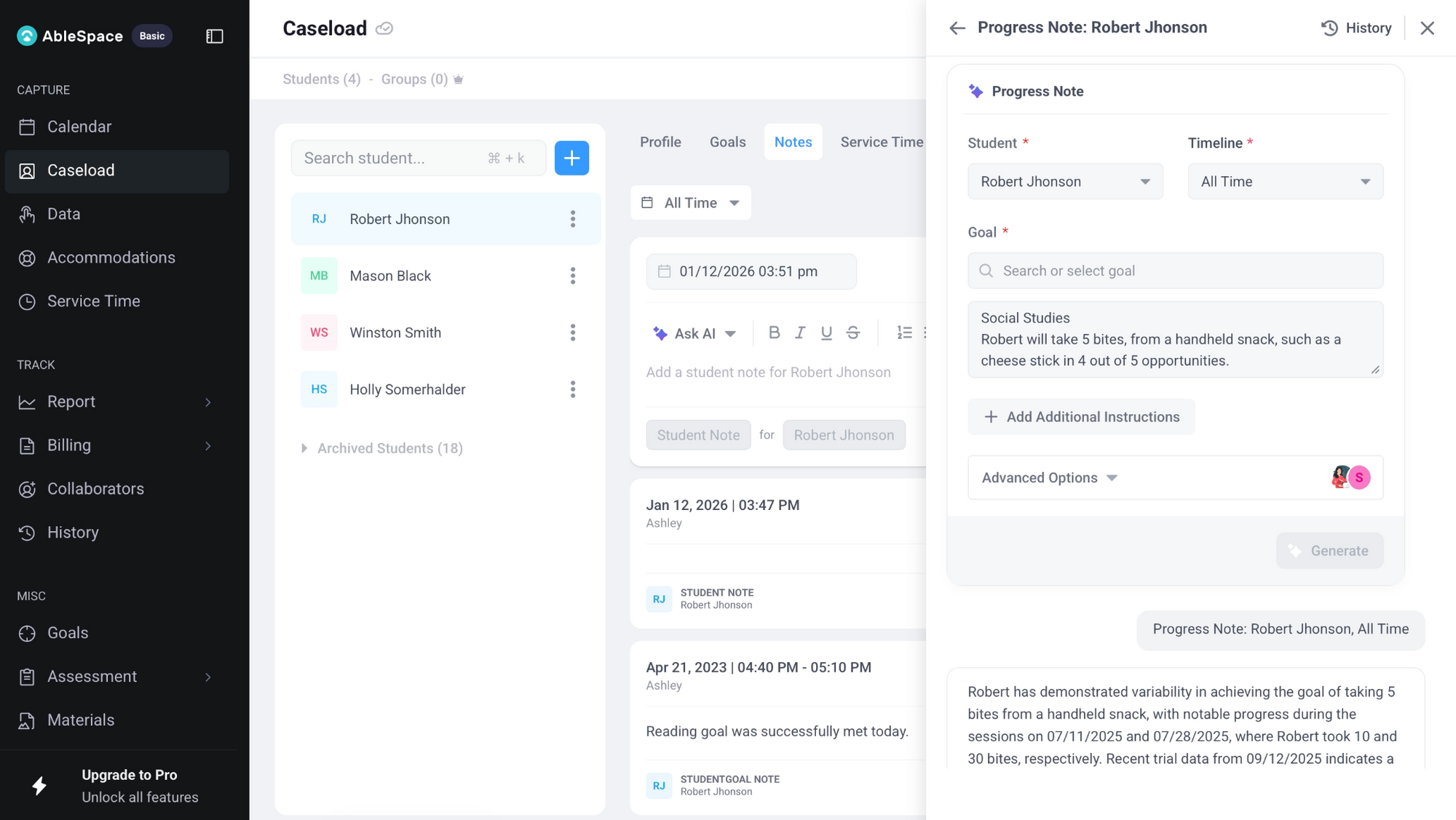
This is also where platforms like AbleSpace come in, since they centralise service minutes, goal data, and provider notes. With everything stored consistently, AI can work from a solid data set, producing insights that reflect your actual sessions rather than fragmented documentation.
4. Edit the Tone, Not Just the Facts
A lot of polished AI notes can end up being emotionally empty. They omit the teacher's sense of nuance, whether it was a major accomplishment, a red flag, or a small victory.
Here’s a quick tone editing checklist you might want to make use of:
1) Does this note sound like someone who knows this student?
2) Is the level of enthusiasm/optimism in the note realistic, or are there over-the-top statements too?
3) Is the language free of jargon and/or vague praise?
4) Is the note honest without sounding punitive?
5. Use AI to Remove Bias, Not Reinforce It
AI has the potential to neutralise any wording that could potentially be perceived as judgmental or emotional.
In fact, when you request the AI to write a sentence as objectively as possible, you can end up seeing phrases that could be interpreted inappropriately.
Example:
Original: “He refused to work again today.”
AI rewrite: “He did not begin the task even with three prompts.”
Original: “She got frustrated quickly.”
AI rewrite: “She raised her voice and left the table after two corrections.”
As you can see, the AI rewrites in both cases removed subjective assumptions and replaced them with observable actions.
This is why you must carefully review all of your AI-generated writing: if it erased out some necessary context, add it back; if you find that the AI added some interpretation you had no intention of including, remove it.
6. Use AI to Shorten Your Documentation, Not Complicate It
Many special education professionals like to believe that longer progress notes are more legitimate. However, lengthy notes can sometimes bury the information that teams need the most.
AI is great at tightening:
- long timelines
- repetitive phrasing, and
- unnecessary qualifiers
So when you ask it to condense while retaining all vital details, your notes become easier for teams, administrators, and/or parents to read.
7. Always End With a Human Decision
AI can describe data.
It can help you format your progress note.
It can also save you a great deal of time when writing.
However, it cannot determine what your next instructional step would be.
That part is all yours.
A well-written progress note, AI-assisted or not, always includes your interpretation:
- “Given this trend, we’ll increase wait time before prompting.”
- “Next session will focus on generalisation in the small-group setting.”
- “To reduce prompt dependence, we will fade verbal cues and increase gestural ones.”
This is the piece AI cannot and should not do for you.
Conclusion
Progress notes will always be personal.
They’re the story of a student you’ve sat beside, redirected, encouraged, and celebrated.
AI simply mutes the noise and clears out the clutter so you can better hear that story. When used properly, your notes stop feeling like just paperwork. They start feeling like what they truly are: the proof of growth you were there to witness.
FAQs
1) How do I prevent AI from smoothing over the ‘messy parts’ of a session that still matter?
Ask the AI to retain the challenges (“Keep all instances of prompt dependence” or “Do not remove moments of task avoidance”). Most tools comply when explicitly told not to sanitise difficulty.
2) What if I don’t have time to write a detailed summary before using AI?
A 20-30 second voice note at the end of the session, later transcribed into text, should be enough to preserve your tone. AI can then be used to structure that initial narration into a cleaner note.
3) What’s the best way to teach paras or co-teachers to use AI for notes?
Show them student-specific examples of what good raw data looks like (rather than just telling them to "write more.") Once they get to see 2-3 examples of detailed vs. vague logging, their AI outputs should improve quickly!