In person, silence carries information. A blank stare signals confusion. A shifted posture signals restlessness. A whispered side conversation signals avoidance.
Online, silence is ambiguous.
A muted microphone could mean focused attention, or complete disengagement. A black screen could mean privacy, or withdrawal. The educator’s ability to read the room is reduced to a grid of names and intermittent audio cues.
Virtual special education has narrowed the feedback loop between student experience and instructional response. The systems that succeed are the ones that deliberately rebuild that loop instead of assuming it still exists.
What Actually Works in Virtual Special Education
1. Explicitly Redesigning IEP Implementation (Not Just Moving It Online)
An IEP written for in-person service delivery does not automatically translate to a virtual environment. Goals tied to physical proximity, visual cueing, or environmental control require reinterpretation.
What works is proactive recalibration:
- Clarifying how prompts will be delivered (verbal, chat-based, screen annotation)
- Defining what “independent” looks like when a caregiver is nearby
- Identifying which accommodations shift format versus function
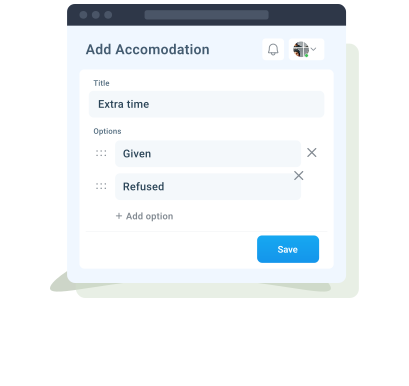
For example, extended time online is not merely extra minutes, it often requires extended access windows, asynchronous options, or flexible submission structures.
The most effective teams revisit the operational definition of each goal and accommodation rather than assuming equivalency.
When accommodation delivery is documented alongside IEP progress monitoring, as enabled through systems like AbleSpace that link supports directly to specific objectives, the data becomes more trustworthy. It becomes clearer whether the student is generalizing the skill or relying on consistent support to access it.
Without that clarity, virtual environments inflate perceived progress.
2. Smaller Instructional Bursts, Tighter Data Cycles
Long virtual sessions disproportionately tax executive functioning. Attention fatigue online is not purely behavioral, it is neurological. Sustained screen-based processing demands more working memory and self-regulation than many students with disabilities can consistently provide.
What works instead:
- 15–20 minute targeted skill blocks
- Immediate practice with rapid feedback
- Frequent, low-stakes data points rather than periodic high-stakes assessments
This structure reduces performance pressure and increases usable data. Virtual platforms make it tempting to collect less frequent, more polished samples. That often masks regression.
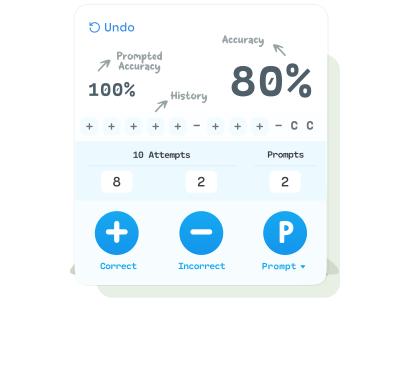
Frequent micro-probes (exit tickets, timed fluency checks, skill-specific tasks) provide more reliable trendlines.
3. Structured Instruction in Assistive Technology Use
Remote learning assumes students can independently navigate digital tools. Many cannot.
Executive functioning challenges manifest as:
- Logging in late due to disorganized digital materials
- Missing assignments buried across platforms
- Inconsistent submission despite task completion
What works is treating digital navigation as an instructional target, not a prerequisite.
Explicit routines for:
- File naming
- Platform navigation
- Submission workflows
- Calendar management
When these systems are taught and reinforced, academic data becomes more accurate. Otherwise, missing work is misinterpreted as skill deficit rather than workflow breakdown.
What Consistently Fails (And Why)
1. Passive Accommodation Delivery
Posting a visual schedule or uploading notes does not equal accommodation delivery.
In virtual environments, accommodations must be activated, not merely available.
Common failure patterns:
- Recorded lessons without chunking
- Breaks offered but not structured
- Preferential seating reinterpreted as “camera optional”
Effective virtual support includes real-time monitoring of whether the accommodation is functioning as intended. If a student receives extra time but continues to submit incomplete work, the accommodation requires redesign, not repetition.
2. Averaging Data Across Contexts
Remote environments blur instructional contexts. A student may perform well in one-on-one virtual sessions yet struggle in whole-group online settings.
Averaging these performances into a single data point obscures meaningful differences.
What fails is collapsing context-dependent performance into simplified percentages.
What works is disaggregating data by setting:
- Direct service vs. general education session
- Independent task vs. caregiver-supported task
- Synchronous vs. asynchronous completion
When educators add brief contextual notes to progress data, as supported within structured IEP tracking systems like AbleSpace, patterns can emerge across instructional settings. Documenting whether work occurred synchronously, asynchronously, or with support helps clarify trends and inform more targeted adjustments.
3. Mislabeling Engagement Fatigue as Noncompliance
Students appearing disengaged on screen are often experiencing cognitive overload rather than defiance.
Virtual fatigue compounds:
- Reduced nonverbal feedback cues
- Increased auditory processing strain
- Environmental distractions at home
- Lack of physical movement
Behavior support plans built around compliance may intensify resistance in this setting.
What works better:
- Predictable visual agendas
- Clear session endpoints
- Built-in camera-optional processing breaks
- Multi-modal response options (chat, poll, shared doc, verbal)
These shifts respect cognitive capacity rather than escalating power struggles.
The Hidden Challenges No One Talks About Enough
Family Proximity Changes Performance
When caregivers are nearby, students may receive unintended prompts. This artificially elevates apparent independence.
Clear family guidance helps:
- Define when prompting is appropriate
- Distinguish support from answer-providing
- Set boundaries around test-like conditions
Without clarity, IEP data becomes inflated and unreliable.
Psychological Safety Feels Different Online
Students who struggled socially in school may initially prefer virtual settings. Others experience heightened anxiety due to constant self-view, unstable internet, or lack of peer cues.
What works:
- Allowing self-view minimization
- Providing structured peer interaction rather than open discussion
- Creating predictable participation norms
Psychological variables directly influence academic data.
Conclusion
Virtual learning challenges traditional definitions of independence. A student who appears to be working independently on screen may still be relying on environmental scaffolds such as timers, multiple browser tabs, digital reminders, or auto-filled prompts that were never present in a traditional classroom setting. Rather than treating this as artificial support, effective teams examine which digital scaffolds represent transferable skills.
Independence in a virtual setting often means managing systems, not just mastering content. When those executive skills are explicitly recognized and measured, online instruction becomes a proving ground for self-management rather than a workaround.